Aquaculture production management system
AquaOS is an aquaculture production management system. It holds the whole production record: what is in every growing unit, what it was fed, how it grew, what it cost, and what the water was doing while it happened. One system, from stocking to harvest.
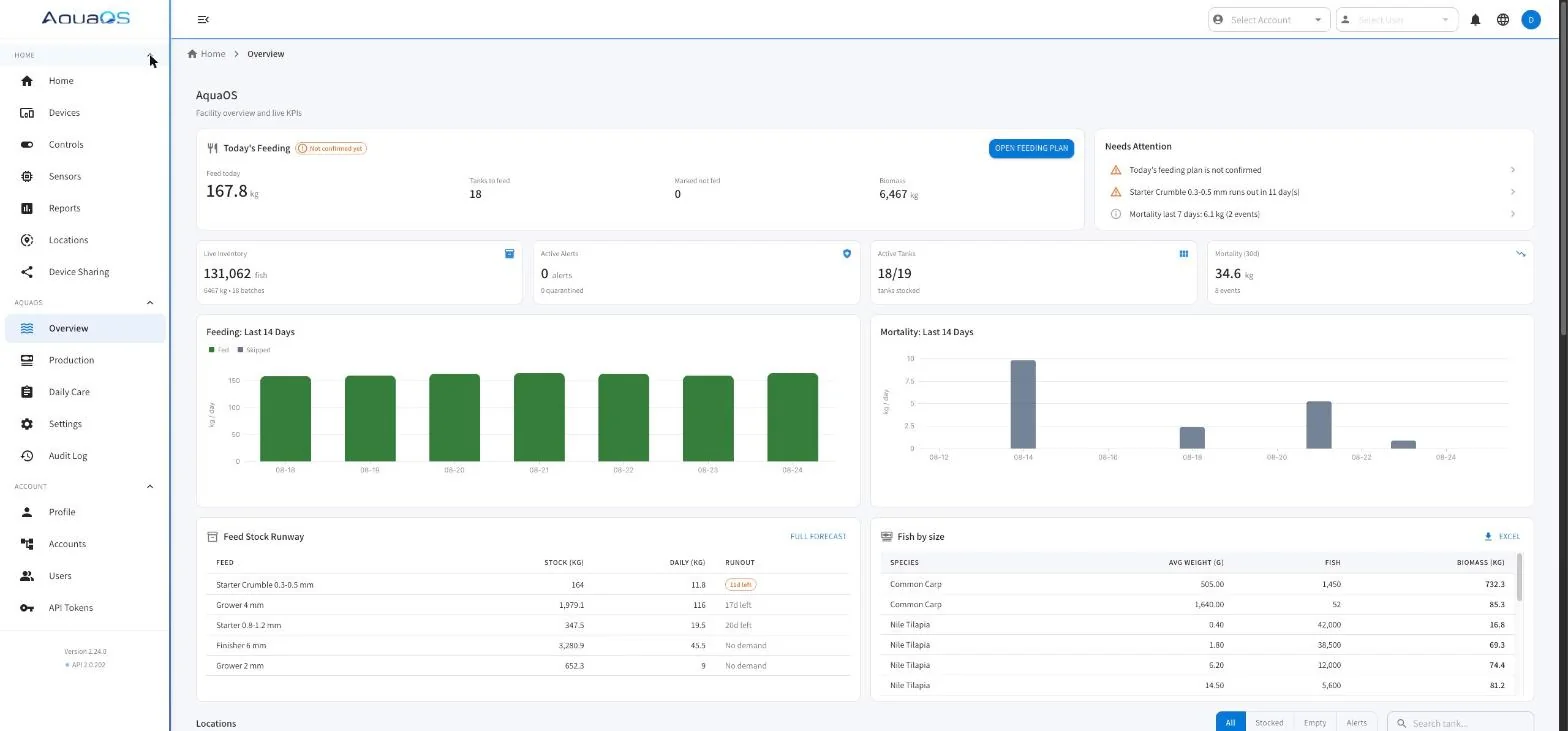
- Web workspace and mobile app
- Multi-site, multi-user, role-based
- Excel and PDF export on every report
- Documented REST API
What the platform covers
The working areas of the product. Each has its own page with the detail a production manager needs before a demo.
Production tracking
Batches from stocking to harvest across ponds, tanks, and incubators, with placements, transfers, splits, merges, and co-mingled units.
Every movement is recorded against the growing unit it happened in, and lineage traces any batch back to its origin.
Production trackingFeeding and feed control
A daily feeding plan built from a feed matrix keyed to species, weight band, and cultivation phase.
Operators confirm what was actually fed and mark skipped days, so the feed record is what happened rather than what was planned.
Feeding and feed controlFeed cost and conversion
Fed kilograms priced against the feed lot they were drawn from, so feed conversion is reported as cost per kg gained as well as a mass ratio.
Each figure states whether it was built on lot cost or item cost, and lots in different currencies are never summed.
Feed cost and conversionProduction planning
An annual plan held beside the record it is measured against, per-spawn survival, and a harvest forecast that reports when stock reaches each size band against the shipments already promised.
Closing a month refuses every backdated write into it.
Production planningHealth and treatment
Treatments recorded against the batches that received them, with withdrawal periods that block every exit to food until they clear and are inherited by child batches through splits.
Quarantine blocks outbound movement with no override.
Health and treatmentHarvest and dispatch
Fish leaving a unit recorded by destination, with the quarantine and withdrawal checks applied before anything moves.
A cull writes its mortality in the same transaction, so a close cannot half-happen.
Harvest and dispatchBroodstock and spawning
Broodstock groups, spawning events, hatch results, and failed spawns recorded against the group that produced them.
Resulting fry enter the same batch model as purchased stock, so the record is continuous from egg onward.
Broodstock and spawningSorting and grading
A sort runs as a live session at a sorting station: pull from source units, grade into size classes, place each class.
Counts and weights reconcile against the source before the session closes, so a grading day does not silently lose fish from the record.
Sorting and gradingWater quality monitoring
Continuous readings from sensors bound to specific growing units, plotted against the production record for that unit.
Threshold alarms reach the people on duty, and the reading history stays attached to the batch that was in the water.
Water quality monitoringReporting and traceability
Pond status by species and unit, per-pond production reports over any period, growth and feed forecasting, and a complete audit trail of who changed what.
Exports to Excel and print-ready PDF.
Reporting and traceabilityMulti-site and access control
Subsidiary accounts under one parent, sites and systems inside each farm, departments that hold read or write on a group of units, and permissions granted per function.
Every write that moves fish is logged and can be reverted after a check, and a reviewed month refuses backdated writes.
Multi-site and access controlOne batch record runs from spawning to harvest
Each stage adds to the same record, so a harvested lot traces back to the broodstock group that produced it.
-
Spawning
- Broodstock groups and tagged individuals
- Spawning events and crosses
- Hatch results
-
Nursery
- Batches created from the hatch
- Samplings and growth rate
- Feeding by phase
-
Grow-out
- The daily feeding plan, confirmed
- Mortality with reasons
- Water quality bound to the unit
-
Sorting and grading
- Sorting sessions reconciled against the source
- Splits, transfers and merges
- Lineage kept through every move
-
Harvest
- Harvest events by destination
- Withdrawal periods checked before any exit to food
- Quarantine blocks outbound movement
How an operation gets onto AquaOS
No implementation project. The platform is configured to the farm, then loaded with what is already in the water.
-
Describe the farm
Sites, growing units, and unit types are defined once. Ponds, tanks, raceways, and incubators each carry their own defaults for volume, area, and feeding.
-
Define the biology
Species, varieties, cultivation phases, and the feed matrix that maps species and weight band to a ration. This is where the farm existing practice becomes the system rules.
-
Load current stock
Stock what is already in each unit with a count, an average weight, and a phase. From that point the daily plan and every projection run off live data.
-
Add sensors when ready
Water quality can be connected on day one or added later. Production management works fully on manual entry, and sensor data joins the same record when it arrives.
What changes once AquaOS is running
One number for biomass
Splits, transfers, sorts, mortality, and sampling all move the same stock figure. There is no second sheet to reconcile against, because there is no second sheet.
Feed spend you can see
Daily rations come from the matrix, confirmed feedings become the feed record, and feed runway shows how many days of stock are left before the next order has to land.
A report that takes a minute
Pond status and per-pond production reports are generated from the live record, exported to Excel or printed as PDF. What used to be a day of file merging is a page load.
Water quality in context
A dissolved oxygen dip is shown next to the batch that was in the tank, the feeding that day, and the mortality that followed. Correlation stops being a reconstruction exercise.
An audit trail by default
Every change is attributed and timestamped. When a number looks wrong, the history shows who set it, when, and what it was before.
Field staff and management need not share a language
Field staff and management can work in different languages against one record, including right-to-left interfaces. Reports localize with the interface.
Where to go next
Buyer guide
How to evaluate aquaculture management software without a six-month trial.
Integrations and API
Protocols, sensor support, REST endpoints, and how data leaves the platform.
Hardware
The sensor and controller layer AquaOS reads from, and what it takes to connect one.
Pricing
What drives the cost of an AquaOS deployment, and how a quote is put together.
Frequently asked questions
Is AquaOS a monitoring dashboard or a management system?
Both, and that is the point. Monitoring dashboards show sensor readings but do not know what is in the tank. Management systems track production but treat water quality as a number someone types in. AquaOS holds the production record and the sensor stream in the same place, bound to the same growing unit.
Can AquaOS be used without any sensors?
Yes. Production management, feeding, sorting, batch tracking, and reporting all work on manually entered data. Sensors add continuous water quality to the same record and can be connected at any point without redoing the setup.
How many users and sites does AquaOS support?
The platform is multi-site and multi-user with role-based access. A single account can hold several sites, each with its own growing units, and users can be scoped to what they need. There is no separate installation per site.
Does AquaOS work on a phone in the field?
Yes. There is a mobile app alongside the web workspace, and the daily operations that happen at the tank side, feeding confirmation, mortality logging, and sampling entry, are designed to be done on a phone.
What happens to data if we stop using AquaOS?
Reports export to Excel and PDF, and the REST API exposes sites, growing units, sensors, readings, batches, and events. The production record can be pulled out in full at any time without a support request.
See AquaOS on your operation
Bring a real production scenario. AquaOS is walked through on your operation, not a canned dataset.