Aquaculture batch tracking software
AquaOS is aquaculture batch tracking software: it records which stock sits in every growing unit and follows it through every split, transfer, merge and co-mingling from stocking to harvest. Splitting a batch across units is the operation that breaks spreadsheet farms. In AquaOS it is a first-class event: fish move, counts and biomass follow, lineage is preserved, and every unit the stock passed through keeps its own history.
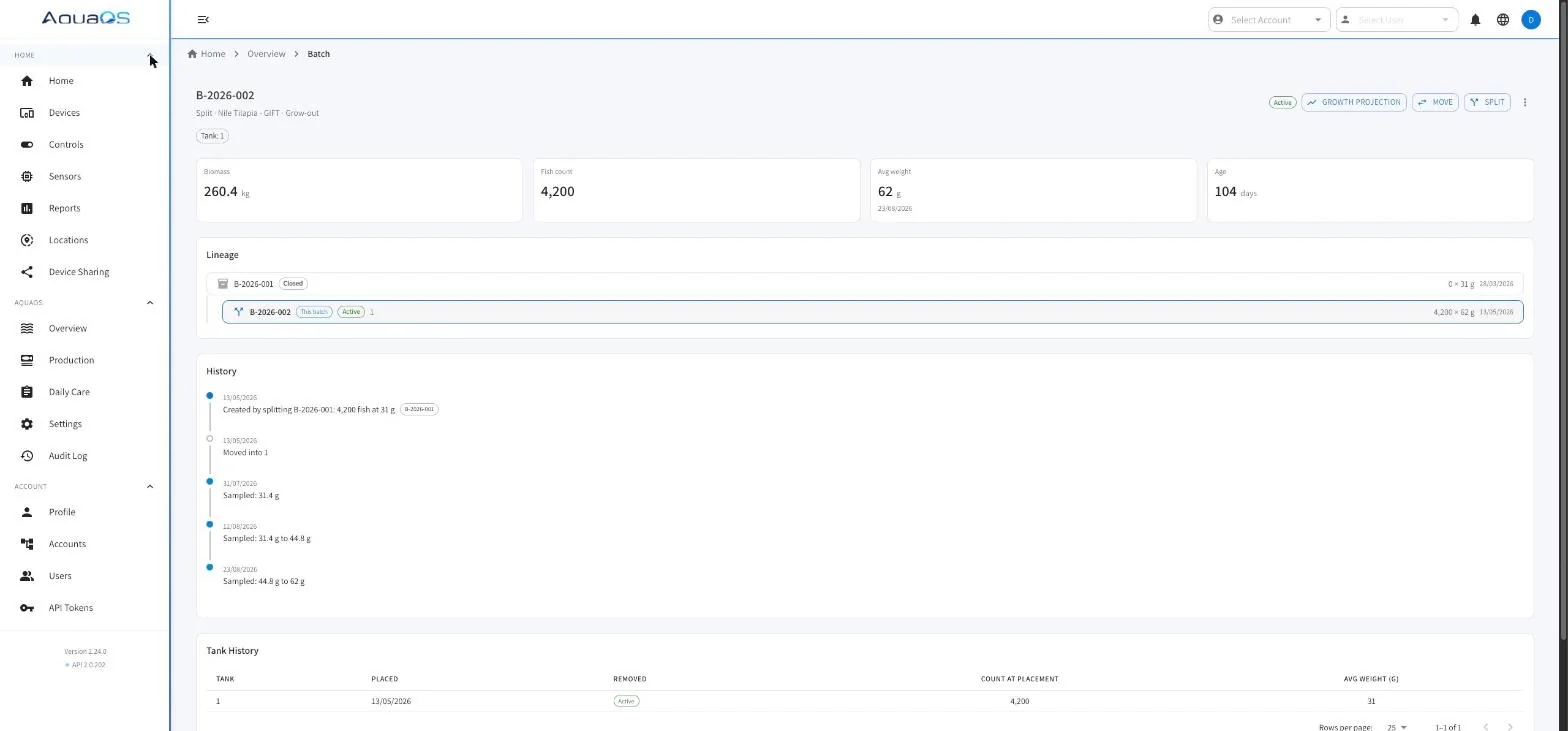
- Stocking to harvest in one record
- Splits, merges, transfers, co-mingling
- Lineage back to the source group
- Per-unit and per-batch history
How does AquaOS track a batch across growing units?
By separating the batch from the place it sits. A batch is a group of animals; a placement is that batch in one growing unit for a period. One batch can occupy several units and one unit can hold several batches, so counts and biomass stay correct when stock moves.
Batches and placements
A batch is a group of animals with a species, a variety, an origin, and a cultivation phase.
A placement is that batch sitting in a specific growing unit for a specific period. One batch can be in several units at once, and one unit can hold several batches. The distinction is what makes partial moves and co-mingling representable at all.
Splits and transfers
Move all or part of a batch to another unit.
A split leaves a residual behind and creates a placement in the destination, with counts and biomass apportioned. A transfer moves a whole placement. Both are logged as events on the source and the destination, so each unit history reads correctly on its own.
Co-mingling
Two batches can share one unit when the operation actually works that way.
Each keeps its own identity, count, and average weight while sharing the tank, and the unit shows the combined biomass for stocking-density purposes. Nothing is forced into a fiction of one batch per tank.
Lineage
Every batch records where it came from: a purchase, a spawning event, a split from another batch, or a sorting session.
The lineage view walks the chain back, so a harvest lot can be traced to the broodstock group or the supplier delivery that started it.
Stock adjustments and sampling
Average weight is updated by sampling, and counts are corrected by explicit adjustments rather than silent edits.
Between samplings, biomass is projected from the growth model, and a new sampling re-anchors it. The report states which figures are measured and which are model-derived.
Mortality
Mortality is logged against the unit and the batch, by count or by weight, with a reason.
It reduces live stock immediately, feeds the mortality trend, and appears on the per-pond report alongside the feed and growth for the same period.
What does a production cycle look like in the record?
Stock, grow, move, close. Each event lands against the placement, biomass and density recalculate as it lands, and a closed batch keeps its complete history for reports.
-
Stock
A batch enters a unit with a count, an average weight, a species, and a cultivation phase. Origin is recorded, whether purchased, hatched on site, or moved from another unit.
-
Grow
Daily feeding and mortality accumulate against the placement. Samplings update average weight. Biomass and density are recalculated as each event lands.
-
Move
Splits, transfers, and sorting sessions redistribute stock as density or size class requires. Each move updates both ends and preserves the lineage link.
-
Close
A batch closes on harvest, sale, or full transfer out, with the reason recorded. The closed batch keeps its complete history and stays available to reports.
Why does accurate batch tracking matter?
Because the daily ration, the feed conversion figure and the traceability chain are all derived from biomass per unit. A stale figure after a split compounds through the cycle; a correct one makes all three usable without reconstruction.
The feed ration is right
Daily rations are calculated from biomass. If biomass is stale after a split, every ration downstream is wrong, and the error compounds across the cycle rather than correcting itself.
FCR means something
Feed conversion is only meaningful when the feed and the growth belong to the same animals. Placement-level tracking is what lets feed given and weight gained be attributed to the same stock.
Traceability is already done
When a buyer, an auditor, or an insurer asks where a harvest lot came from, the lineage chain answers it. Nothing has to be reconstructed from delivery notes and memory.
Related capabilities
Sorting and grading
How a grading session redistributes a batch into size classes without losing the count.
Feeding and feed control
How the daily ration is derived from the biomass this page keeps correct.
Reporting and traceability
Pond status, per-pond production reports, and the audit trail behind every change.
Fish farming
Several species across ponds, raceways, and cages, held in one record with multi-site rollups.
Frequently asked questions
Can one growing unit hold more than one batch?
Yes. AquaOS supports co-mingled units where two or more batches share a tank or pond. Each batch keeps its own count, average weight, and identity, while the unit reports combined biomass for density. This is a real operating pattern on working farms, not an exception the system fights.
What happens to the numbers when a batch is split?
A split creates a placement in the destination unit and reduces the source, apportioning count and biomass between them. Both units log the event, and the new placement carries a lineage link back to the source batch. Biomass in every affected unit is correct immediately, which is the specific failure that spreadsheets have.
How is average weight kept up to date between samplings?
Sampling sets a measured average weight and re-anchors the record. Between samplings, weight is projected forward from the growth model so the daily ration keeps up with the fish. Reports mark which figures are measured and which are model-derived rather than presenting both as equally certain.
Can historical batches be reviewed after harvest?
Yes. Closed batches keep their full event history, placements, and lineage, and remain available to reports. A finished cycle can be reviewed for growth, feed, and mortality after the fact.
See AquaOS on your operation
Bring a real production scenario. AquaOS is walked through on your operation, not a canned dataset.